More information
Background
Every Odoo team reaches a point where standard reports need to go a step further—closer alignment with specific business requirements often calls for either development work, technical tools like QWeb, or accepting a compromise. Wilson Works built Banded Report Writer to simplify that path and make advanced reporting more accessible.
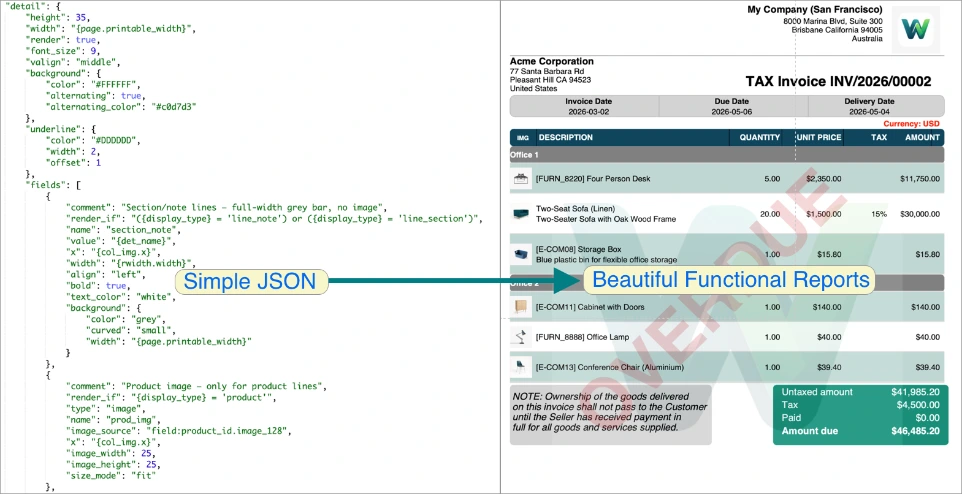
Developed by Wilson Works and drawing on more than 17 years of Odoo consulting experience,, Banded Report Writer brings true banded reporting (in the style of Crystal Reports) into Odoo. Reports are defined in clean, validated JSON, rendered in pure Python, and delivered as professional PDFs—with no QWeb, no wkhtmltopdf complexity, and no custom code. Functional consultants, business analysts, and end users can design, deploy, and iterate entirely from within the Odoo UI.
Banded Report Writer is available in three editions for both Community and Enterprise Odoo: a fully featured Free core engine, a Community Library for sharing and discovering reports across the Odoo ecosystem, and Pro, which adds images, watermarks, runtime parameters, SQL data sources, snippet libraries, and scheduled email delivery. The Free and Community Library editions are available for direct download below, while Pro is published on the Odoo Apps Store.
How It Works
The Banded Reporting Model
Banded Report Writer brings the classic “banded” reporting paradigm — familiar from tools like Crystal Reports — directly into Odoo. A report is built from discrete horizontal bands that fire at predictable moments: a report header on the first page, page headers on every page, detail bands repeated for each data record, group headers and footers when data changes, and page/report footers for summaries and page numbers. Each band contains fields positioned by X and Y coordinates, giving you pixel-precise control over layout without touching QWeb or WKHTMLTOPDF.
One Foundational Idea: Flat In, Banded Out
Every Banded Report Writer report consumes a flat list of rows, where each row already carries every value the report could ever need — including values that “belong” to a group header or footer. We deliberately repeat group-level data on every row instead of nesting it.
This single design choice is the reason BRW is so flexible and predictable. Grouping, sorting, subtotals, page breaks, and conditional bands all become simple, regular operations on a uniform input. The hard work of joining tables and shaping data lives where it belongs — in your data source — not buried inside the report template.
The result: there is never any mystery about where a value comes from, every report behaves the same way, and reports are easy to reason about, modify, and migrate. It is a deliberate decision rooted in decades of classic banded-reporting practice — one that has paid off in every report we have built.
Structured JSON, Validated End-to-End
Everything about a report — bands, fields, data sources, grouping rules, formatting, colours, and constants — is declared in a single, clean JSON document. This is not loose markup: every key is validated against a strict schema, every field type is checked, every layout reference is resolved, and every colour token is verified before a single PDF byte is produced. The rendering engine is pure Python (ReportLab), with zero Odoo dependencies in its core, so the same definition runs consistently whether you are designing in Odoo 19 today or porting tomorrow.
Schema Rigor Enables AI and Guaranteed Quality
Because the format is tightly structured, we can do things ad-hoc template systems cannot. The built-in validator catches typos instantly — “Unknown key ‘fond_size’ — did you mean ‘font_size’?” — and the complete JSON schema is published as a machine-readable reference. That same schema powers our curated AI prompts: the AI Report Builder knows every valid key, every band type, and every formatting rule, so it generates working JSON on the first try rather than guessing. The result is a system where human authors, automated validators, and AI assistants all speak the same precise language.
Steps to Get Started
1 Install the Module
Install Banded Report Writer from the Odoo Apps Store. The free module includes everything you need to create professional reports.
2 Create Your First Report
Use the Automated Report Builder to generate a report in minutes. Select your data model, choose fields, and the system creates a complete banded report definition.
3 Customize as Needed
Edit the JSON directly for advanced customization. Add grouping, aggregates, formatting, and more. The built-in help guides you through each option.
4 Attach to Any Model
Link your report definition to any Odoo model. Print directly from the action menu on any record.
5 Print & Share
Generate professional PDFs instantly. Share with customers, partners, or internal teams.
📚 Ready Out of the Box
11 tutorial reports are included to help you learn. Run them, examine them, modify them. Everything you need is included.
📚 Don't forget to install the shared community reports module
Share your beautiful reports with the community and benefit from other's others contributions. We envisage the library becoming a valuable repository of quality reports for both the free and pro versions.
Frequently Asked Questions
Do I need to know Python or QWeb to use this?
No. Banded Report Writer is designed specifically for non-developers. You define reports entirely in JSON through the built-in editor — no Python coding, no QWeb templates, no XML. The only skill you need is understanding your data model (which Odoo already shows you in the UI).
Will this work with my custom Odoo modules?
Yes. Banded Report Writer can bind to any Odoo model — built-in or custom. As long as you can see the model in Odoo’s UI, you can create a report for it using the Automated Report Builder or by writing a JSON definition manually.
Is the Pro module required to create reports?
No. The free version is fully functional and includes all core banded reporting features: band layouts, grouping, aggregates, formatting, pagination, and PDF output. Pro adds advanced features like SQL data sources, images, watermarks, parameters, scheduling, and snippet libraries — but you can create complete professional reports without it.
Can I migrate reports between databases?
Yes. Report definitions are stored as pure JSON, which is completely portable. You can export a report definition, copy it to another database, and it will run identically — no dependencies on custom code or external assets.
How does this compare to Odoo’s built-in QWeb reports?
Odoo’s native QWeb reports require HTML/CSS knowledge and developer access. They are powerful but inaccessible to functional users. Banded Report Writer gives you the same professional PDF output through a simple JSON interface — think of it as “Crystal Reports for Odoo” but without the code. It is not a replacement for complex bespoke QWeb reports, but it covers 90% of business reporting needs without touching a single line of code.
What about support and updates?
We are committed to continuous improvement. The free module receives bug fixes and compatibility updates for new Odoo versions. Human support is always available. We also provide curated AI prompts that act as a support agent and a report builder — both included free.
Free vs Pro Feature Comparison
The Banded Report Writer is a comprehensive, free report engine for Odoo. The optional Pro module extends it with advanced features for professional report design, automation, and integration.
Note: Installing Pro automatically extends the free module — all existing reports continue to work unchanged.
Upgrade to Pro
The free version is fully functional for creating professional banded reports. Upgrade to Pro when you need images, watermarks, snippets, parameters, or advanced data sources.
Core Report Engine
| Feature | Free | Pro |
|---|---|---|
| Band-based layout (report header, page header, detail, page footer, report footer) | ✅ | ✅ |
| Multi-page reports with automatic page breaks | ✅ | ✅ |
| Page sizes — A4, Letter, Legal | ✅ | ✅ |
| Portrait and landscape orientation | ✅ | ✅ |
| Configurable margins (top, bottom, left, right) | ✅ | ✅ |
| Developer PDF Preview (in-browser, no download) | ✅ | ✅ |
| JSON schema validation with typo detection and suggestions | ✅ | ✅ |
| Report Builder wizard (guided report creation) | ✅ | ✅ |
| Debug layout mode (visualise band boundaries) | ✅ | ✅ |
| Generate PDF button (download) | ✅ | ✅ |
| REST API — HTTP POST PDF generation | ✅ | ✅ |
Data Sources & Queries
| Feature | Free | Pro |
|---|---|---|
| ORM data sources with Odoo domain filters | ✅ | ✅ |
| Parent-child (master-detail) data sources via One2many fields | ✅ | ✅ |
| Dot-notation for related fields | ✅ | ✅ |
| Dynamic domain variables ({company_ids}, {today}, {active_ids}) | ✅ | ✅ |
| SQL data sources — direct SQL queries | — | ✅ |
| Cross-table JOINs for complex multi-table reporting | — | ✅ |
| Parameterized SQL queries with safe %(name)s binding | — | ✅ |
Field Types & Formatting
| Feature | Free | Pro |
|---|---|---|
| Static text labels | ✅ | ✅ |
| Dynamic field values with {field_name} placeholders | ✅ | ✅ |
| Currency formatting — locale-aware with per-record symbol | ✅ | ✅ |
| Number formatting — locale-aware with thousands separator | ✅ | ✅ |
| HTML to plain text conversion | ✅ | ✅ |
| Image fields — render images in any band | — | ✅ |
| Image size modes — fit, stretch, original | — | ✅ |
| Conditional image rendering with render_if | — | ✅ |
Layout & Styling
| Feature | Free | Pro |
|---|---|---|
| Text alignment — left, right, center | ✅ | ✅ |
| Vertical alignment — top, middle, bottom | ✅ | ✅ |
| Bold and italic text (band and field level) | ✅ | ✅ |
| Font families — Helvetica, Times, Courier | ✅ | ✅ |
| Text color — hex #RRGGBB or named colors | ✅ | ✅ |
| Band backgrounds — solid or alternating row colors | ✅ | ✅ |
| Band borders and underlines | ✅ | ✅ |
| Named panels — positioned rectangles with backgrounds | ✅ | ✅ |
| Rounded corners (curved) | ✅ | ✅ |
| Watermarks — text or image on every page | — | ✅ |
| Watermark customization — opacity, rotation, font, color | — | ✅ |
Grouping, Totals & Summaries
| Feature | Free | Pro |
|---|---|---|
| Multi-level grouping by any field | ✅ | ✅ |
| Group header and footer bands (per level) | ✅ | ✅ |
| Aggregate functions — SUM, COUNT, AVG, MIN, MAX | ✅ | ✅ |
| Subtotals at each group level | ✅ | ✅ |
| Report footer with grand totals | ✅ | ✅ |
| Nested/hierarchical grouping (multiple levels) | ✅ | ✅ |
| Automatic page breaks per group | ✅ | ✅ |
| Continuation text for multi-page groups | ✅ | ✅ |
Report Parameters & Prompts
| Feature | Free | Pro |
|---|---|---|
| Runtime parameter prompts — dynamic wizard | — | ✅ |
| Date range parameters — 25+ built-in presets | — | ✅ |
| Selection/dropdown parameters | — | ✅ |
| Text, number, and boolean parameters | — | ✅ |
| Parameter values in domains | — | ✅ |
| Run Reports menu — opt-in quick-access for prompted & non-prompted reports | — | ✅ |
| Cron-ready defaults — unattended execution | — | ✅ |
Publishing, Print, Email & Scheduling
| Feature | Free | Pro |
|---|---|---|
| Publish to Action Menu wizard | ✅ | ✅ |
| Cross-model report actions | ✅ | ✅ |
| Print & Send — bind to Odoo’s Print button | — | ✅ |
| Default Report mode — replace built-in reports | — | ✅ |
| Scheduled reports via cron | — | ✅ |
| generate_pdf_attachment() — server-side PDF | — | ✅ |
| generate_and_email() — generate and send via email | — | ✅ |
JSON Editing & Productivity
| Feature | Free | Pro |
|---|---|---|
| JSON editor with syntax highlighting | ✅ | ✅ |
| JSON schema validation on save | ✅ | ✅ |
| Typo detection with suggestions | ✅ | ✅ |
| Report Builder wizard | ✅ | ✅ |
| JSON Compact All Fields | — | ✅ |
| JSON Expand All Fields | — | ✅ |
| JSON Expand Band | — | ✅ |
Reusable Components
| Feature | Free | Pro |
|---|---|---|
| Constants — report-level layout variables | ✅ | ✅ |
| Constants — band-level, scoped to a specific band | ✅ | ✅ |
| Palette definition for style consistency | ✅ | ✅ |
| Layout references — {name.x}, {name.width} | ✅ | ✅ |
| Named panels — store x, y, width, height | ✅ | ✅ |
| Snippet Libraries — reusable JSON fragments | — | ✅ |
| Band snippets — standard headers, footers | — | ✅ |
| include_snippet at any JSON level | — | ✅ |
Learning Resources
| Feature | Free | Pro |
|---|---|---|
| 11 progressive tutorials (Tutorial 01–11) | ✅ | ✅ |
| 7 Pro tutorials (Tutorial Pro 01–07) | — | ✅ |
| In-app User Guide | ✅ | ✅ |
| In-app Quick Reference | ✅ | ✅ |
| Pro User Guide | — | ✅ |
| Pro Schema reference | — | ✅ |
Summary
| Free | Pro | |
|---|---|---|
| Total features | 100+ | 140+ |
| Data source types | ORM | ORM + SQL |
| Report actions | Action Menu | Action Menu + Print & Send |
| Automation | Manual | + Cron, email |
| Media | Text only | + Images + Watermarks |
| Parameters | — | 5 types, 25+ presets |
| Tutorials | 11 | 11 + 7 Pro |
Changelog
| Version | Type | Changes |
|---|---|---|
| 1.0.0 | Initial | Core banded report engine with JSON editor, grouping, aggregates, PDF output, and 11 tutorial reports |
🔄 Active Development
This module is continuously maintained. All bug fixes and Odoo version compatibility updates are provided free of charge. Upgrade to Pro to unlock advanced features as your reporting needs grow.
How It Works
The Banded Reporting Model
Banded Report Writer brings the classic “banded” reporting paradigm — familiar from tools like Crystal Reports — directly into Odoo. A report is built from discrete horizontal bands that fire at predictable moments: a report header on the first page, page headers on every page, detail bands repeated for each data record, group headers and footers when data changes, and page/report footers for summaries and page numbers. Each band contains fields positioned by X and Y coordinates, giving you pixel-precise control over layout without touching QWeb or WKHTMLTOPDF.
One Foundational Idea: Flat In, Banded Out
Every Banded Report Writer report consumes a flat list of rows, where each row already carries every value the report could ever need — including values that “belong” to a group header or footer. We deliberately repeat group-level data on every row instead of nesting it.
This single design choice is the reason BRW is so flexible and predictable. Grouping, sorting, subtotals, page breaks, and conditional bands all become simple, regular operations on a uniform input. The hard work of joining tables and shaping data lives where it belongs — in your data source — not buried inside the report template.
The result: there is never any mystery about where a value comes from, every report behaves the same way, and reports are easy to reason about, modify, and migrate. It is a deliberate decision rooted in decades of classic banded-reporting practice — one that has paid off in every report we have built.
Structured JSON, Validated End-to-End
Everything about a report — bands, fields, data sources, grouping rules, formatting, colours, and constants — is declared in a single, clean JSON document. This is not loose markup: every key is validated against a strict schema, every field type is checked, every layout reference is resolved, and every colour token is verified before a single PDF byte is produced. The rendering engine is pure Python (ReportLab), with zero Odoo dependencies in its core, so the same definition runs consistently whether you are designing in Odoo 19 today or porting tomorrow.
Schema Rigor Enables AI and Guaranteed Quality
Because the format is tightly structured, we can do things ad-hoc template systems cannot. The built-in validator catches typos instantly — “Unknown key ‘fond_size’ — did you mean ‘font_size’?” — and the complete JSON schema is published as a machine-readable reference. That same schema powers our curated AI prompts: the AI Report Builder knows every valid key, every band type, and every formatting rule, so it generates working JSON on the first try rather than guessing. The result is a system where human authors, automated validators, and AI assistants all speak the same precise language.
Steps to Get Started
1 Install the Module
Install Banded Report Writer from the Odoo Apps Store. The free module includes everything you need to create professional reports.
2 Create Your First Report
Use the Automated Report Builder to generate a report in minutes. Select your data model, choose fields, and the system creates a complete banded report definition.
3 Customize as Needed
Edit the JSON directly for advanced customization. Add grouping, aggregates, formatting, and more. The built-in help guides you through each option.
4 Attach to Any Model
Link your report definition to any Odoo model. Print directly from the action menu on any record.
5 Print & Share
Generate professional PDFs instantly. Share with customers, partners, or internal teams.
📚 Ready Out of the Box
11 tutorial reports are included to help you learn. Run them, examine them, modify them. Everything you need is included.
📚 Don't forget to install the shared community reports module
Share your beautiful reports with the community and benefit from other's others contributions. We envisage the library becoming a valuable repository of quality reports for both the free and pro versions.
Frequently Asked Questions
Do I need to know Python or QWeb to use this?
No. Banded Report Writer is designed specifically for non-developers. You define reports entirely in JSON through the built-in editor — no Python coding, no QWeb templates, no XML. The only skill you need is understanding your data model (which Odoo already shows you in the UI).
Will this work with my custom Odoo modules?
Yes. Banded Report Writer can bind to any Odoo model — built-in or custom. As long as you can see the model in Odoo’s UI, you can create a report for it using the Automated Report Builder or by writing a JSON definition manually.
Is the Pro module required to create reports?
No. The free version is fully functional and includes all core banded reporting features: band layouts, grouping, aggregates, formatting, pagination, and PDF output. Pro adds advanced features like SQL data sources, images, watermarks, parameters, scheduling, and snippet libraries — but you can create complete professional reports without it.
Can I migrate reports between databases?
Yes. Report definitions are stored as pure JSON, which is completely portable. You can export a report definition, copy it to another database, and it will run identically — no dependencies on custom code or external assets.
How does this compare to Odoo’s built-in QWeb reports?
Odoo’s native QWeb reports require HTML/CSS knowledge and developer access. They are powerful but inaccessible to functional users. Banded Report Writer gives you the same professional PDF output through a simple JSON interface — think of it as “Crystal Reports for Odoo” but without the code. It is not a replacement for complex bespoke QWeb reports, but it covers 90% of business reporting needs without touching a single line of code.
What about support and updates?
We are committed to continuous improvement. The free module receives bug fixes and compatibility updates for new Odoo versions. Human support is always available. We also provide curated AI prompts that act as a support agent and a report builder — both included free.
Free vs Pro Feature Comparison
The Banded Report Writer is a comprehensive, free report engine for Odoo. The optional Pro module extends it with advanced features for professional report design, automation, and integration.
Note: Installing Pro automatically extends the free module — all existing reports continue to work unchanged.
Upgrade to Pro
The free version is fully functional for creating professional banded reports. Upgrade to Pro when you need images, watermarks, snippets, parameters, or advanced data sources.
Core Report Engine
| Feature | Free | Pro |
|---|---|---|
| Band-based layout (report header, page header, detail, page footer, report footer) | ✅ | ✅ |
| Multi-page reports with automatic page breaks | ✅ | ✅ |
| Page sizes — A4, Letter, Legal | ✅ | ✅ |
| Portrait and landscape orientation | ✅ | ✅ |
| Configurable margins (top, bottom, left, right) | ✅ | ✅ |
| Developer PDF Preview (in-browser, no download) | ✅ | ✅ |
| JSON schema validation with typo detection and suggestions | ✅ | ✅ |
| Report Builder wizard (guided report creation) | ✅ | ✅ |
| Debug layout mode (visualise band boundaries) | ✅ | ✅ |
| Generate PDF button (download) | ✅ | ✅ |
| REST API — HTTP POST PDF generation | ✅ | ✅ |
Data Sources & Queries
| Feature | Free | Pro |
|---|---|---|
| ORM data sources with Odoo domain filters | ✅ | ✅ |
| Parent-child (master-detail) data sources via One2many fields | ✅ | ✅ |
| Dot-notation for related fields | ✅ | ✅ |
| Dynamic domain variables ({company_ids}, {today}, {active_ids}) | ✅ | ✅ |
| SQL data sources — direct SQL queries | — | ✅ |
| Cross-table JOINs for complex multi-table reporting | — | ✅ |
| Parameterized SQL queries with safe %(name)s binding | — | ✅ |
Field Types & Formatting
| Feature | Free | Pro |
|---|---|---|
| Static text labels | ✅ | ✅ |
| Dynamic field values with {field_name} placeholders | ✅ | ✅ |
| Currency formatting — locale-aware with per-record symbol | ✅ | ✅ |
| Number formatting — locale-aware with thousands separator | ✅ | ✅ |
| HTML to plain text conversion | ✅ | ✅ |
| Image fields — render images in any band | — | ✅ |
| Image size modes — fit, stretch, original | — | ✅ |
| Conditional image rendering with render_if | — | ✅ |
Layout & Styling
| Feature | Free | Pro |
|---|---|---|
| Text alignment — left, right, center | ✅ | ✅ |
| Vertical alignment — top, middle, bottom | ✅ | ✅ |
| Bold and italic text (band and field level) | ✅ | ✅ |
| Font families — Helvetica, Times, Courier | ✅ | ✅ |
| Text color — hex #RRGGBB or named colors | ✅ | ✅ |
| Band backgrounds — solid or alternating row colors | ✅ | ✅ |
| Band borders and underlines | ✅ | ✅ |
| Named panels — positioned rectangles with backgrounds | ✅ | ✅ |
| Rounded corners (curved) | ✅ | ✅ |
| Watermarks — text or image on every page | — | ✅ |
| Watermark customization — opacity, rotation, font, color | — | ✅ |
Grouping, Totals & Summaries
| Feature | Free | Pro |
|---|---|---|
| Multi-level grouping by any field | ✅ | ✅ |
| Group header and footer bands (per level) | ✅ | ✅ |
| Aggregate functions — SUM, COUNT, AVG, MIN, MAX | ✅ | ✅ |
| Subtotals at each group level | ✅ | ✅ |
| Report footer with grand totals | ✅ | ✅ |
| Nested/hierarchical grouping (multiple levels) | ✅ | ✅ |
| Automatic page breaks per group | ✅ | ✅ |
| Continuation text for multi-page groups | ✅ | ✅ |
Report Parameters & Prompts
| Feature | Free | Pro |
|---|---|---|
| Runtime parameter prompts — dynamic wizard | — | ✅ |
| Date range parameters — 25+ built-in presets | — | ✅ |
| Selection/dropdown parameters | — | ✅ |
| Text, number, and boolean parameters | — | ✅ |
| Parameter values in domains | — | ✅ |
| Run Reports menu — opt-in quick-access for prompted & non-prompted reports | — | ✅ |
| Cron-ready defaults — unattended execution | — | ✅ |
Publishing, Print, Email & Scheduling
| Feature | Free | Pro |
|---|---|---|
| Publish to Action Menu wizard | ✅ | ✅ |
| Cross-model report actions | ✅ | ✅ |
| Print & Send — bind to Odoo’s Print button | — | ✅ |
| Default Report mode — replace built-in reports | — | ✅ |
| Scheduled reports via cron | — | ✅ |
| generate_pdf_attachment() — server-side PDF | — | ✅ |
| generate_and_email() — generate and send via email | — | ✅ |
JSON Editing & Productivity
| Feature | Free | Pro |
|---|---|---|
| JSON editor with syntax highlighting | ✅ | ✅ |
| JSON schema validation on save | ✅ | ✅ |
| Typo detection with suggestions | ✅ | ✅ |
| Report Builder wizard | ✅ | ✅ |
| JSON Compact All Fields | — | ✅ |
| JSON Expand All Fields | — | ✅ |
| JSON Expand Band | — | ✅ |
Reusable Components
| Feature | Free | Pro |
|---|---|---|
| Constants — report-level layout variables | ✅ | ✅ |
| Constants — band-level, scoped to a specific band | ✅ | ✅ |
| Palette definition for style consistency | ✅ | ✅ |
| Layout references — {name.x}, {name.width} | ✅ | ✅ |
| Named panels — store x, y, width, height | ✅ | ✅ |
| Snippet Libraries — reusable JSON fragments | — | ✅ |
| Band snippets — standard headers, footers | — | ✅ |
| include_snippet at any JSON level | — | ✅ |
Learning Resources
| Feature | Free | Pro |
|---|---|---|
| 11 progressive tutorials (Tutorial 01–11) | ✅ | ✅ |
| 7 Pro tutorials (Tutorial Pro 01–07) | — | ✅ |
| In-app User Guide | ✅ | ✅ |
| In-app Quick Reference | ✅ | ✅ |
| Pro User Guide | — | ✅ |
| Pro Schema reference | — | ✅ |
Summary
| Free | Pro | |
|---|---|---|
| Total features | 100+ | 140+ |
| Data source types | ORM | ORM + SQL |
| Report actions | Action Menu | Action Menu + Print & Send |
| Automation | Manual | + Cron, email |
| Media | Text only | + Images + Watermarks |
| Parameters | — | 5 types, 25+ presets |
| Tutorials | 11 | 11 + 7 Pro |
Changelog
| Version | Type | Changes |
|---|---|---|
| 1.0.0 | Initial | Core banded report engine with JSON editor, grouping, aggregates, PDF output, and 11 tutorial reports |
🔄 Active Development
This module is continuously maintained. All bug fixes and Odoo version compatibility updates are provided free of charge. Upgrade to Pro to unlock advanced features as your reporting needs grow.